![Diane Poremsky [Outlook MVP]](http://www.outlook-tips.net/images/2014/MVP_BlueOnly.png)
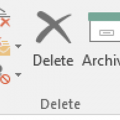
You can no longer change the Archive folder for Outlook.com & Office 365 Exchange accounts. Outlook creates a folder called Archive that is used. POP and IMAP users can select the desired folder to use for Archive.After the latest build of Office 2016 (16.0.6741.2014) is installed, users will see an Archive button on the Home ribbon, next to Delete and also in opened … [Read more...] about Outlook 2016's New Archive Button
Using Split Screen in Outlook Email
My question is this simple... I upgraded from Outlook 2013 to 2016 on Windows 10. Back in Outlook 13 I had "split screen" functionality so I could compare one section of an e-mail with another section of that same e-mail with a very simple horizontal divider and a vertical scrolling bar for each section.I can't seem to find the split screen functionality in Office 2016 … [Read more...] about Using Split Screen in Outlook Email
Outlook 2016 POP Account Problems (Fixed)
This is fixed in build 16.0.6568.2036. To get the update manually, go to File > Office Account > Update Options > Update Now. The February 2016 update for Outlook 2016 is causing problems for POP3 users. Build 16.0.6568.2025 is causing problems for people who have Outlook set to leave mail on the server for a period of time. Instead of deleting the aged mail from the server, … [Read more...] about Outlook 2016 POP Account Problems (Fixed)
Edit the Subject in Outlook Email Messages
I use Outlook 2010 and 2013 mostly, where I used the Other Actions button "Edit message" command to annotate messages I have received. (For example, to change a subject like "A question for you" to something more specific, to more easily find it again.)In Outlook 2016, I can still use the "Edit message" command, but it no longer lets me change the Subject, only the message … [Read more...] about Edit the Subject in Outlook Email Messages
Send New Mail Notification to Phone
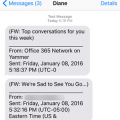
Is there a way to have an Office 365 business account send only a notification or SMS to another email/phone without sending the entire email? I only want notifications when an email was received on that account, not the entire email. Sure, you can forward notifications to your smartphone. You won't be able to forward to another address as this will forward the entire message, … [Read more...] about Send New Mail Notification to Phone