![Diane Poremsky [Outlook MVP]](http://www.outlook-tips.net/images/2014/MVP_BlueOnly.png)
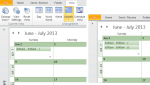
A common complaint: When using the month view on days with several appointments, Outlook only shows the first few, with a down arrow icon which expands to Day view if there are more appointments. Because its easy to overlook the truncated cells in the month view, there is a high probability of overlooking an appointment.Their question always goes something like this: Is … [Read more...] about Tip 892: Show More Appointments on Outlook's Calendar
appointments
Tip 891: Move a series of appointments to new dates

It is possible to move (or copy) a series of appointments to new dates and maintain the series pattern. While in the Calendar Month view, carefully select the appointments, holding Ctrl as you make the selections, then right-click and drag the selection to date navigator calendar. You need to drop the appointments on the date the last selected appointment should be moved … [Read more...] about Tip 891: Move a series of appointments to new dates
Tip 874: Schedule multiple non-recurring appointments

A user recently asked about scheduling recurring appointments that don’t fit a recurrence pattern “Our company just started with Outlook and we have not been able to figure out how to schedule an appointment with multiple dates that are not a recurring date.”While this is a feature in other corporate mail systems, Outlook (and Exchange server) supports only recurring … [Read more...] about Tip 874: Schedule multiple non-recurring appointments
Change the Sound used for the New Mail Alert
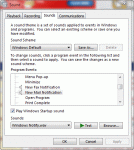
You can change the sound played for the new mail alert in the Windows Control Panel, Sound applet. (In older versions of Windows its called Sounds and Audio Properties.) This screen shot is from Windows 7, but the dialog looks very similar in other versions. Change the default sound for new mail to another sound file on your system. Or use Google (or Bing) to find .wav … [Read more...] about Change the Sound used for the New Mail Alert
Identifying Outlook's Icons: More Icons

Microsoft Outlook uses a lot of icons throughout the program and it's hard to remember what each icon means. Help lists some icons but finding them is a daunting task for many users. On these next pages, you'll find all of the icons and a short description when needed. Mail | Calendar & Tasks | Contacts & Journal Rules & Alerts | Toolbars | More … [Read more...] about Identifying Outlook's Icons: More Icons