![Diane Poremsky [Outlook MVP]](http://www.outlook-tips.net/images/2014/MVP_BlueOnly.png)
In Outlook 2003 (and earlier), using the "Find" command its possible to search on multiple items such as "Johnson, Smith, Jones" and the comma acts as the OR condition.Windows 8 does not include Outlook 2013 items in it's search index. If using Outlook 2010 and older, Outlook items may be listed in Search again in, in the Windows Explorer search ribbon.While the comma … [Read more...] about Tip 896: Searching with the OR operator (and other search syntax)
outlook 2007
Outlook 2007 crashes after installing IE9

We're seeing reports that Outlook 2007 crashes when opening HTML formatted messages after IE9 is installed. It looks like the problem is specific to Outlook installed on Vista. At this time we are recommending users uninstall IE9 (or avoid installing it on Vista). You can do this from Control Panel, Programs and Features. Click on installed updates and look for the IE9 … [Read more...] about Outlook 2007 crashes after installing IE9
How to Reset the View on Outlook folders
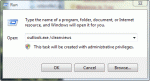
Many times users are told to "reset the view" to fix problems with the display in Outlook but they don't know how to do this. There are two ways top do this. Outlook 2010 and up: look on the views ribbon for the Reset Views button to rest a single view or use the /cleanviews switch to reset all views. Reset All Views in All Folders First, you can reset the views for … [Read more...] about How to Reset the View on Outlook folders
How to create a new Outlook 2007 or 2010 profile
Need a new Outlook 2002 or Outlook 2003 profile? See Creating a New Outlook 2002/2003 Profile. For Outlook 2000, see Creating a New Outlook 2000 Profile If Outlook is open, close it. Go to Control Panel, Mail - it's in the User Accounts category or switch to Classic view. In 64-bit versions of Windows you'll find Mail under the 32 bit group. Alternately, you can … [Read more...] about How to create a new Outlook 2007 or 2010 profile
Disable the Group By View in Outlook
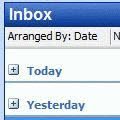
Note: You can use this method to apply any changes to all folders using the same view. It's not limited to the group by feature. While this method also works with Outlook 2010, you can create a custom view and apply it to all folders. Look for the Apply to all folders option on the View ribbon, Change View button. Apply to all folders is useful if you have custom views you … [Read more...] about Disable the Group By View in Outlook