![Diane Poremsky [Outlook MVP]](http://www.outlook-tips.net/images/2014/MVP_BlueOnly.png)
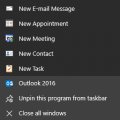
When you right click on Outlook in the task bar, you can select one of the shortcuts from the Jump list. However, it's not uncommon to lose the jump list if you uninstall or repair the Office installation.To fix it, you need to delete a registry key and restart Outlook. If you have Outlook pinned to the start screen and/or taskbar, you need to unpin it before restarting … [Read more...] about Shortcuts are Missing from the Outlook Icon (Jump List)
outlook
Outlook Error Ox800ccc13 in Windows 10
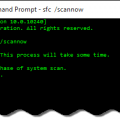
We're seeing a few errors from Outlook users after upgrading to Windows 10, specifically a message reporting problems sending messages. The affected users receive error 0x800CCC13. 'Task 'email address alias@domain.com- Sending' Cannot connect to the network. Verify your network connection or modem.'.Reinstalling or repairing the Office install, making new profiles and … [Read more...] about Outlook Error Ox800ccc13 in Windows 10
Settings don't stick when you click Cancel
From the “I never would have guessed this in a million years” file.Every now and again, there are problems so obscure that only someone experiencing it would be able to figure it out. This was one of those problems.Why do I have to clear "leave a copy of message on the server" every time I start Outlook? It works fine, once I uncheck the button, and all emails are … [Read more...] about Settings don't stick when you click Cancel
Tip 1129: Fix Send to Mail Recipient in Windows Explorer
Yes, I've been terribly remiss in not doing tips over the last few months. My New Years Resolutions were simple: get back on track with the Tips and get my hair cut the first of every month. I broke both resolutions by the end of the first week. It was cold and snowy and easy to skip the hair cut, but that excuse won't fly for Tips. :)I received a "cold call" email from a … [Read more...] about Tip 1129: Fix Send to Mail Recipient in Windows Explorer
Tip 1126: Copy and paste Appointments into new time slots
This question came from an Outlook user who recently upgraded to Outlook 2013:In Outlook 2013, I create an appointment on a specific day with a specific start and end time, set a reminder, etc. and Save it. When I go to the month view, I can click on the appointment to select it, then type Ctrl+C to copy it. I select another date and paste it using Ctrl+V. Except it … [Read more...] about Tip 1126: Copy and paste Appointments into new time slots