![Diane Poremsky [Outlook MVP]](http://www.outlook-tips.net/images/2014/MVP_BlueOnly.png)
Every now and again, we get asked if there is there a limit to the number of Automatic formatting rules. (Conditional Formatting in Outlook 2010)The question usually goes something like this:In Tools/Organize, you can choose a color to display a message from a specific sender when messages are received in Inbox. I'm getting the message: "You can not add another color … [Read more...] about Tip 877: Maximum number of automatic formatting rules
views
Find Outlook's Custom View Menu
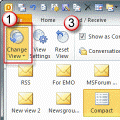
There are several ways you can access the dialog to customize or reset the views. Some of the menus offer two options: Define views or Customize Current View. More information on which to choose is at the end of this article. Outlook 2010: It's much easier to customize and reset views in Outlook 2010, thanks to the View ribbon. 1. Expand the Change view menu to select a … [Read more...] about Find Outlook's Custom View Menu
View all Appointments that don't have reminders

Outlook 2007's Day/Week/Month calendar doesn't have the reminder icon, making it hard to see at a glance if you need to set a reminder. You can make it easier with a custom view that hides items without reminders. The Remind Beforehand field displays the number of minutes before an event that the reminder will fire, the Reminder field displays the bell icon when a reminder … [Read more...] about View all Appointments that don't have reminders
How to Reset the View on Outlook folders
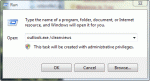
Many times users are told to "reset the view" to fix problems with the display in Outlook but they don't know how to do this. There are two ways top do this. Outlook 2010 and up: look on the views ribbon for the Reset Views button to rest a single view or use the /cleanviews switch to reset all views. Reset All Views in All Folders First, you can reset the views for … [Read more...] about How to Reset the View on Outlook folders
Using Outlook's Automatic Formatting
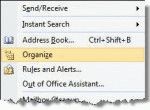
Microsoft Outlook has a feature called Automatic Formatting which lets you color items in a list, making them easier to see. While it's called an "automatic formatting rule" its not a Rule applied by the Rules Wizard but a feature of a View. The formatting is not applied directly to the item and will be "lost" if you move the item to a new folder or change the view. You can … [Read more...] about Using Outlook's Automatic Formatting