![Diane Poremsky [Outlook MVP]](http://www.outlook-tips.net/images/2014/MVP_BlueOnly.png)
The following are icons you may see in Outlook 2013, Outlook 2016, or newer Calendar folders. If you have an older version of Outlook, the icons will be similar in most cases.
Calendar Icons
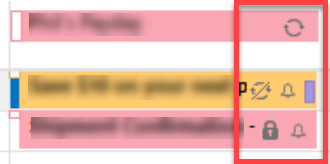
In current versions of Outlook, the Daily, Week, and Monthly calendars won't display icons by default. You'll need to turn on the option to Show bell icon on the calendar for appointments and meetings with reminders in File, Options, Calendar to see these icons.
| List View Icons | Calendar | Description |
 | Appointment | |
 | Recurring Appointment | |
 | Scheduled meeting | |
 | Recurring Meeting | |
| | | Exception to recurring item This symbol is used when you make an exception to a recurring appointment or task. | |
 |  | Data conflict Lets you know conflict exists between your local store and your Exchange Server data. To resolve the conflict, open the item and follow the instructions shown on your screen. You may see these icons with a PDA as well. |
| Private item – Items marked as private display this icon. | ||
 | Indicates a reminder is associated with this item. | |
 | A file attachment is associated with this item | |
| More items. There are more items than can be shown in the current view. Click to open the date in Day view. |
Meeting & Assigned Task icons on messages in the Inbox
Icon | Description |
 | Meeting request icon used on Meeting Request forms. |
 | Declined Meeting request |
 | Cancelled Meeting Request |
 | Accepted Meeting Request |
 | Tentative Acceptance (or Propose New Time in Outlook 2003) |
 | Icons with the blue i symbol  indicate there is more information, such as an update to the meeting request. indicate there is more information, such as an update to the meeting request. |
 | Accepted Task notification in sender's mailbox |
 | Declined Task |
Task Icons
This list contains the icons you'll see in Outlook's Task folder and To-Do List.
Icon | Description |
 | Task form |
 | Recurring Task |
 | Assigned Task (In Senders task list) |
 | Task Request (In recipients task list) |
 | Journaled Task |
 | Journeled Task response or Task Request |
Mail | Calendar & Tasks | Contacts & Journal
Rules & Alerts | Toolbars | More Icons
Published May 14, 2011. Last updated on October 25, 2020.